 Schedult
Your posts
Move or delete a post
Drag a post to another day, pick a new date and time, or remove a post before it goes out.
You can move or delete any post that hasn’t gone out yet, right on your Calendar.
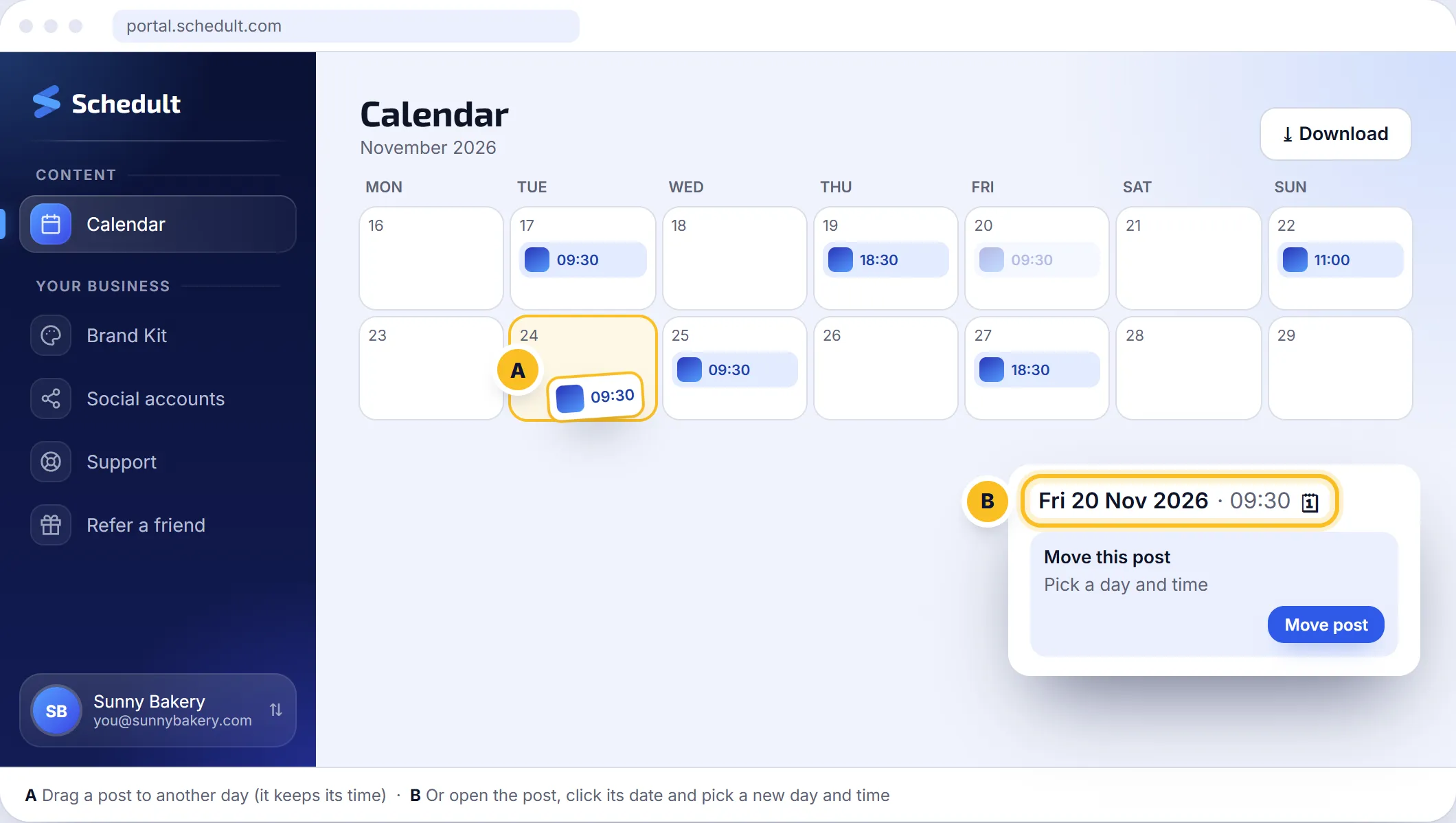
Move a post to another day
- Go to Calendar.
- Drag the post to another day. It keeps the same time of day.
Move a post to another date and time
- Click the post to open it.
- Click the post’s date at the top of the window. Move this post opens.
- Pick the new day and time and click Move post.
Comments and ratings on the post move with it.
Why can’t I move this post?
- It goes out in less than 15 minutes, or it has already started publishing.
- The new time is less than 15 minutes from now. Pick a later time.
- The new time is more than a year away.
Delete a post
- Click the post to open it.
- Click delete and confirm.
The post is removed from your calendar and won’t go out on any channel. This can’t be undone.
Pause your posts for a while
Going on holiday, closed for a period, or something happened that makes posting feel wrong? Contact us with the dates and we’ll pause or move your posts. For a single post, move or delete it yourself.