 Schedult
Getting started
Find your way around the portal
What every page in your Schedult portal is for.
In this article
Your portal at portal.schedult.com is where you see your posts, manage your brand and talk to us. It works in any browser on phone, tablet or computer; there’s no app to install.
The menu
| Page | What it’s for |
|---|---|
| Your trial | Shows during your free trial: where things stand and what we need from you |
| Calendar | Your posts for the month: preview, rate, ask for changes, move or delete |
| Blog posts | Shows when your plan includes blog posts |
| Ads | Shows when you use Schedult Ads |
| Brand Kit | Logo, colours, fonts, tone, products, photos and posting times |
| Social accounts | Connect, check and reconnect your channels |
| Support | Send us a ticket and read our replies |
| Refer a friend | Your share link and rewards |
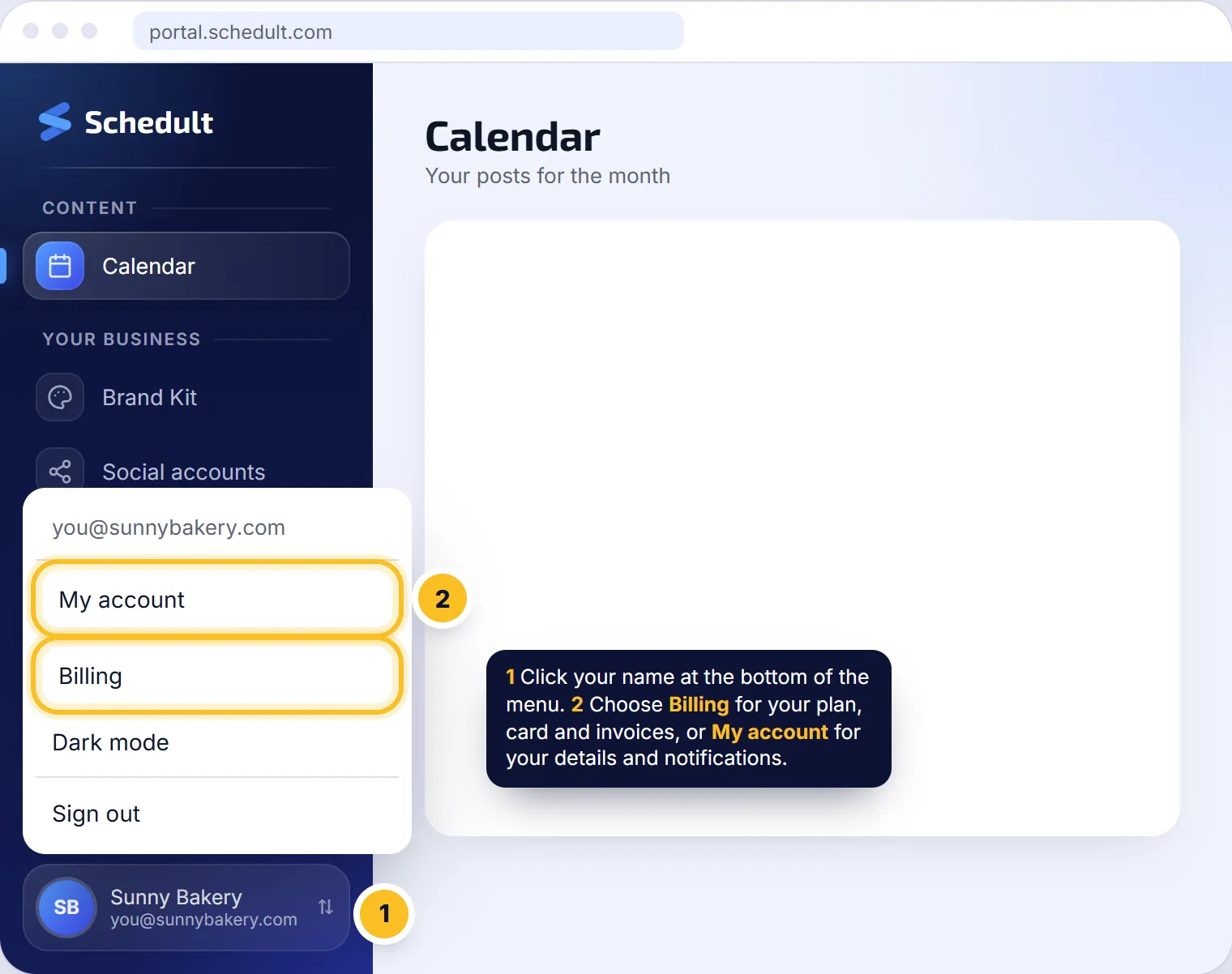
| Billing (under your name) | Your plan, card, invoices and extras |
| My account (under your name) | Your details and which notifications you get |
Billing and My account aren’t in the main list: click your name at the bottom of the menu to open them.
The bell
The bell at the top shows notices: replies to your tickets, new posts scheduled, new blog posts, disconnected profiles and referral news. See Notifications and emails.
Download your posts
On the Calendar, the Download button saves all your scheduled posts as one PDF, handy for sharing with your team.